PerfPulse
A utility-grade developer tool with real install paths, real runtime constraints, and three usable interfaces.
PerfPulse started as a fix for a slow video call and turned into a product lesson: distribution is part of the feature. The project proves I can build tooling that feels fast, ships cleanly, and respects the system it is inspecting.
Why this tool exists
Activity Monitor could tell me what was hurting my machine, but it could not act on the insight. PerfPulse closes that gap: it shows the state, explains the state, and gives you a next step that respects developer reality.
The design constraint was simple: if the monitoring tool is itself heavy, it has already failed. That is why Rust, small binaries, and minimal runtime overhead mattered from the start.
perf-pulse top
PID    CPU%   MEM%   PROCESS
4289   43.1   12.8   Docker Desktop
1884   26.4    8.1   Slack
9192   18.7    6.3   vite dev server

recommendation -> enable meeting mode to pause heavy background processesOne core, three interfaces
PerfPulse architecture
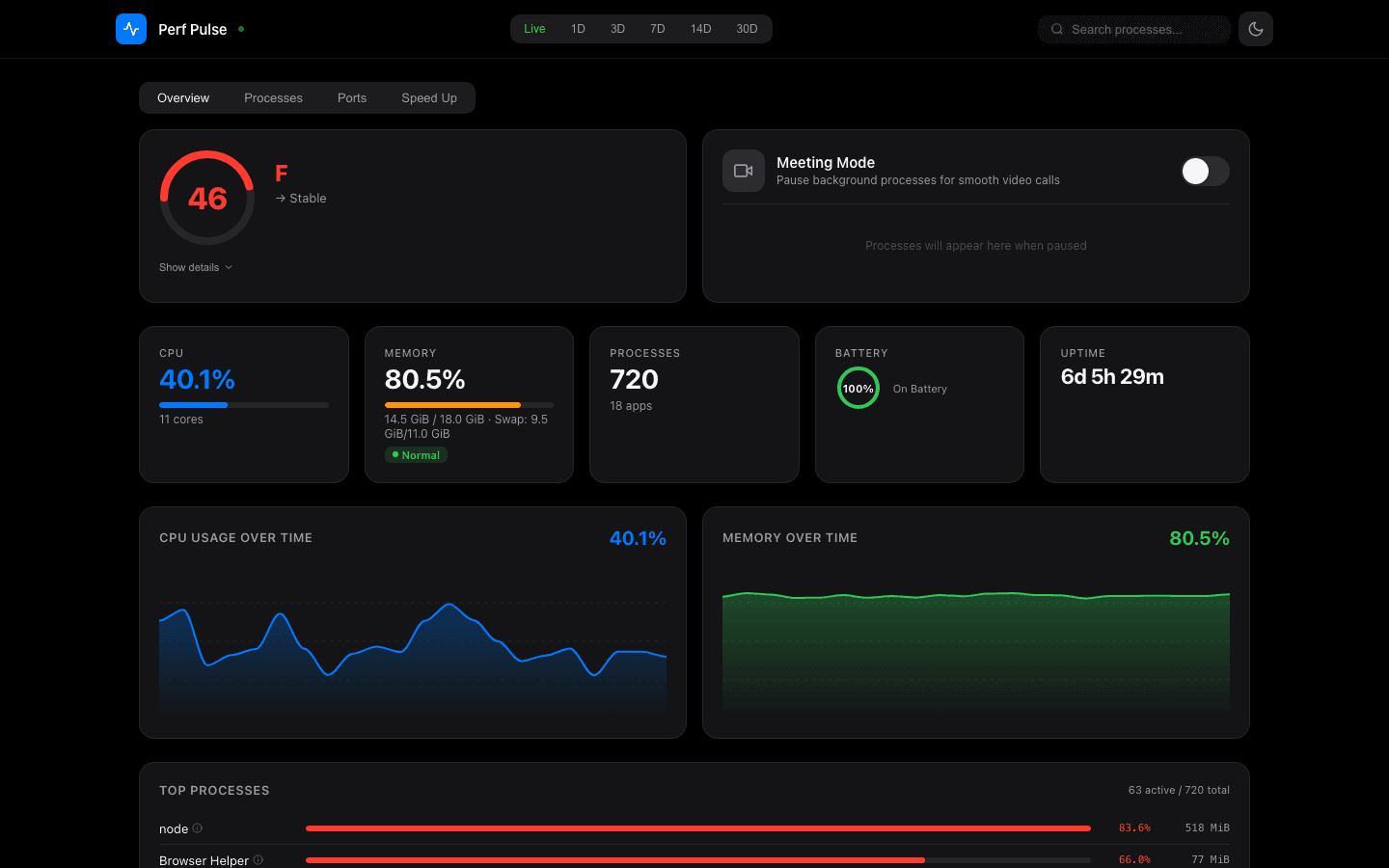
The same Rust core powers a CLI, a local web dashboard, and a tiny TUI, with optional Claude explanations layered on top.
Distribution made the project real
The CLI is the primary surface. The Axum dashboard exists because some signals deserve charts. The TUI exists because sometimes the right answer is to stay in the terminal. Together they make the tool feel complete instead of clever.
- Meeting mode pauses heavyweight background processes before a call, then resumes them later.
- Claude explanations add context when process names are opaque instead of pretending AI is the whole product.
- The dashboard stays inside the Rust binary, which keeps install and deployment complexity low.
surfaces
perf-pulse                # CLI — the primary surface
perf-pulse tui            # terminal dashboard
perf-pulse serve          # http://127.0.0.1:7575

modes
  meeting                 # pause heavy bg processes
  default                 # live top + history
  claude                  # layered explanations

everything ships inside one 3.3 MiB Rust binary.Homebrew is not a bonus feature
distribution
$ brew tap hopeatina/perf-pulse
$ brew install perf-pulse
$ perf-pulse serve

launches local dashboard at http://127.0.0.1:7575
Distribution is the feature.
A tool nobody can install is a tool nobody uses. PerfPulse is strongest when judged like a real utility product: install path, runtime footprint, and operator clarity.
$ brew install hopeatina/perf-pulse/perf-pulse